Inspect and debug an FMV recording
This tutorial downloads the project's checksum-pinned public fixtures, inventories their streams, explains conformance findings, and opens one in the reference player. It requires FFmpeg for browser playback.
Install the development checkout
git clone git@github.com:trane293/stanag4609.git
cd stanag4609
python -m venv .venv
source .venv/bin/activate
python -m pip install -e '.[dev]'
python scripts/fetch_public_fixtures.py
The MPEG files are written under the ignored samples/private/ directory.
They are not committed to Git. The fetcher validates the exact source archive or
file before installing it; see public fixtures for the
recorded identities and expected contents.
Verify structure and conformance
stanag4609-verify "samples/private/ffmpeg-mpegts-klv/Day Flight.mpg"
stanag4609-verify "samples/private/esri-fmv/Truck.ts" --format html > truck-report.html
A non-zero result does not necessarily mean the file is unplayable. For example,
the daylight file has valid H.264, KLVA discovery, transport continuity, and ST
0601 checksums, but uses a deployed four-byte encoding for a field defined as two
bytes. Truck.ts is playable but omits a Metadata STD descriptor and has source
timing/sequence diagnostics. The verifier reports these facts instead of silently
weakening the selected profile.
Use the structural profile when the immediate question is whether the container can be safely read:
Actual output: Esri Truck fixture
The following is an excerpt captured from the command above against the
checksum-pinned fixture (SHA-256
8667276b2c2fb36baa089b00e3978f55893cacf6e0d8f6e6d480bb934747cc79):
FMV verification report
Source: samples/private/esri-fmv/Truck.ts
Result: FAIL
Input: 103211436 bytes, 548997 TS packets, 1 program(s)
Metadata: 356 KLV packet(s), 356 ST 0601, 0 ST 0903, 0 unknown
VMTI targets: 0 observation(s), 0 stream-scoped unique ID(s)

Streams:
  program 1 PID 0x0100 video: stream_type=0x1B, PES=4439, ST0604=0/4439 access units, 1920x1080 Baseline Level 4.1 progressive
  program 1 PID 0x0101 audio: stream_type=0x0F, PES=6946, mpeg-2-aac-lc, frames=6946, 48000 Hz, 2 channel(s)
  program 1 PID 0x0102 klv: stream_type=0x15, PES=711, synchronous

ST 0601 services:
  program 1 PID 0x0102 service 0: packets=356, tags=37 known/0 unknown, versions=[1]
    MISP Item 2: first=1348087826484970, last=1348087974296682; UTC converted=0, unavailable=356

Summary: 33 error(s), 4 warning(s), 14 passed, 1 not applicable
This is an expected FAIL, not a broken tutorial: the public recording is
playable and structurally useful. The expanded verifier now reports its missing
Metadata STD descriptor and embedded ST 0604 timestamps, malformed or absent
ST 0902 fields, non-profile AVC signalling, PCR cadence, metadata sequence, and
decoder-delay findings. Repeated packet-level occurrences are aggregated under
stable finding codes, which is why the summary counts findings rather than bad
packets. Generate the self-contained HTML form with the earlier --format html
command:
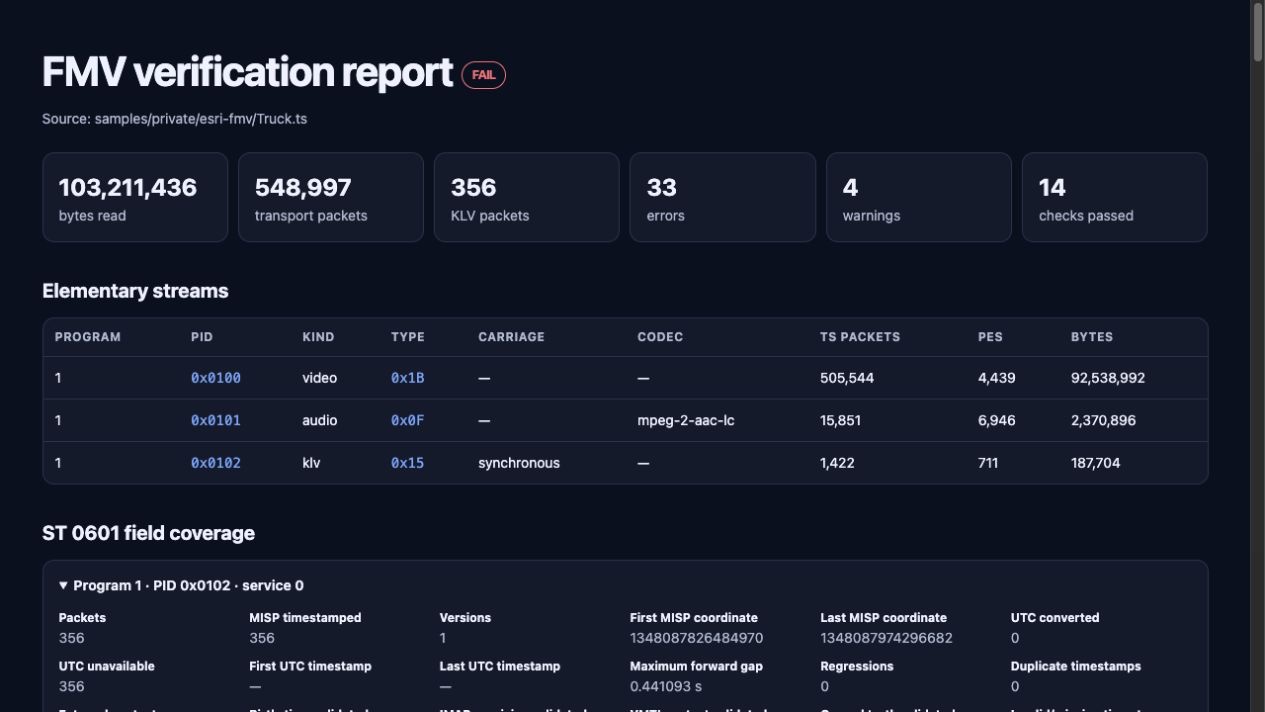
Captured from the real Truck.ts fixture; the visible failure is the expected
diagnostic result for this independently authored sample.
View synchronized video and metadata
The command prepares a seekable browser asset, then opens a localhost server. The UI follows media PTS rather than packet arrival time and displays the current Report-on-Change state, map geometry, VMTI overlays, and sample diagnostics. Stop it with Ctrl-C.

The bundled player at 17.93 seconds: H.264 video, current ST 0601 fields, frame-center geometry on OpenStreetMap, and metadata diagnostics all derive from the same transport and playhead. This source has no VMTI, so detection controls and the timeline correctly show zero observations.
Export the same timeline
stanag4609-export-geojson "samples/private/esri-fmv/Truck.ts" truck.geojsonl
stanag4609-export-esri "samples/private/esri-fmv/Truck.ts" truck.csv
GeoJSON is emitted as one line per metadata update so a GIS adapter can consume it incrementally. CSV provides the familiar ArcGIS FMV sidecar boundary. Neither export changes the source file.
Automate this in Python
from stanag4609.player import scan_transport_file
from stanag4609.verifier import verify_fmv_file

report = verify_fmv_file("mission.ts")
if report.errors:
    for finding in report.findings:
        print(finding.status.value, finding.code, finding.message)

timeline = scan_transport_file("mission.ts")
for sample in timeline.samples:
    publish(sample.time_seconds, sample.fields, sample.geospatial)
Use the verifier for acceptance policy and the timeline for presentation. Do not treat a successful player scan as a conformance result.