Reference player
The optional local reference player supports both seekable recordings and live MPEG-2 transport input. It transcodes to browser-compatible H.264/AAC with FFmpeg, decodes the original KLV with the pure-Python demuxer, and displays the most recent MISB ST 0601 sample beside the video at its media-relative PTS.
The test suite passes the exact inline JavaScript shipped in the player through Node's syntax checker. Local development without Node skips that optional test; CI requires it, preventing parse-time UI failures from shipping unnoticed.
To exercise incremental browser delivery instead of downloading the complete timeline JSON, enable the first-party Server-Sent Events mode:
Low-latency live mode
Pass --live to process bytes as they arrive instead of preparing a complete
MP4. A regular file is useful for smoke testing; - reads MPEG-TS from stdin:
stanag4609-player mission.ts --live
ffmpeg -i 'udp://0.0.0.0:5000' -map 0 -c copy -f mpegts - \
  | stanag4609-player - --live
To exercise the identical bounded live pathway from a complete file at wall clock speed, use simulated-live mode. The player obtains the media duration with FFprobe and paces bytes at the selected average rate:
stanag4609-player mission.ts --simulate-live
stanag4609-player mission.ts --simulate-live --playback-rate 2
For demos with no third-party footage, generate or directly launch the two first-party synthetic FMVs. Their moving telemetry is authored by this project, their pictures and tone come from FFmpeg's deterministic generators, and the resulting data is dedicated under CC0 while the generator remains MIT licensed:
stanag4609-player --demo day
stanag4609-player --demo thermal --simulate-live
stanag4609-demo-samples samples/demo --duration 30
The gateway fans every input chunk into the incremental KLV decoder and an
FFmpeg pipe. FFmpeg uses a 32 KiB/0.5-second bounded input probe, ultrafast,
zero-latency H.264 encoding, optional AAC, and a forced keyframe every second. Complete moof/mdat units are numbered
and delivered to the bundled Media Source Extensions client as soon as they
exist; the player does not wait for input EOF. The first media PTS observed is
the live session origin, and metadata samples retain their source PTS so the
browser selects state by the same media clock.
The default late-join window retains 12 complete media fragments and 512
metadata samples. Override these with --live-media-fragments and
--live-metadata-samples. A client that falls behind the media window receives
HTTP 409 and must rejoin at a current keyframe rather than silently displaying
corrupt delta frames. SSE clients receive numbered samples, an explicit reset
event when history was lost, keepalives, and an end or error event. Browser
SourceBuffer history is trimmed to 30 seconds.
After a gateway restart, an SSE Last-Event-ID from the prior numbering epoch
may be ahead of the new stream. The server emits an immediate cursor_ahead
reset and replays its retained metadata window. A future media-fragment cursor
fails immediately with HTTP 409; the bundled browser client disposes that
MediaSource and rejoins from a current initialization/keyframe automatically.
Transient network and server failures use exponential retries capped at five
seconds. Unsupported media types and explicit transcoder failures remain
terminal and visible rather than creating an endless retry loop.
Media and metadata histories are broadcast rather than consumed queues. The CI contract publishes both streams while eight HTTP viewers read concurrently and requires every viewer to receive identical ordered IDs and payloads through clean end-of-stream. This proves bounded functional fan-out, not a capacity claim for the standard-library reference server. Measure and provision the authenticated front end separately for a production viewer count.
Single-program TS is selected automatically. For MPTS, pass
--program-number N; the same program selector is applied to FFmpeg video/audio
mapping and the Python metadata demuxer. Ambiguous MPTS is rejected rather than
mixing pictures from one service with telemetry from another.
LivePlayerGateway.feed() intentionally blocks when FFmpeg cannot consume more
input. That is bounded backpressure, not an internal queue. A UDP/service
adapter must choose whether to block upstream, shed an entire reconnect epoch,
or provision more capacity; it must not discard arbitrary TS bytes. The
gateway and server are a reference deployment, not an authenticated public
service. They bind to loopback by default; add TLS, authentication,
authorization, origin controls, and deployment-specific resource limits before
exposing them beyond a trusted host.
Relay the transport stream to another application
The player can expose a start/stop control for one fixed UDP destination. The destination is configured by the operator, not typed into the web page:
The right panel then shows MPEG-TS → udp://127.0.0.1:5000. Start the output there and open the complete transport, including its original video, audio, and KLV PIDs, in VLC:
For a recorded file, each start begins a wall-clock-paced replay from the start
of the transport. In --live and --simulate-live modes, the output is a tee
of the currently arriving transport and does not retain arbitrary past input.
Datagrams contain seven complete 188-byte TS packets where possible and a
smaller whole-packet final datagram, following the ST 1402 transport mapping.
The same output can feed an ArcGIS deployment or another FMV receiver when that specific product and version accepts MPEG-TS over UDP. This is a standards-level transport output, not a claim that every vendor's discovery, network, security, or session conventions are interchangeable.
Only an explicit IP literal is accepted. The page cannot redirect output to an arbitrary address, and its control calls require a random per-process token plus the existing trusted-Host checks. Multicast is possible when the operator explicitly configures a multicast address; routing and interface selection remain deployment concerns. Treat the reference server as local tooling, not as an authenticated public stream gateway.
Use stanag4609-benchmark-live mission.ts to measure this exact gateway on a
deployment host. The benchmark guide defines the method,
machine-readable schema, pinned baseline, and the limits of those measurements.
If metadata is supplied separately in ArcGIS FMV Multiplexer CSV format, create the transport first:
The mux command preserves the input media bitstreams, adds a synchronous KLVA PID, and aligns the first CSV timestamp to the first video PTS. It requires FFmpeg for the container remux but keeps KLV creation and MPEG-TS injection in the dependency-free Python package.
The command binds only to 127.0.0.1:8765 by default and opens the system
browser. Use --no-open, --port, or --ffmpeg to override those choices.
A non-loopback --host additionally requires --allow-remote and at least one
explicit --allowed-host; requests with any other HTTP Host value receive 421.
This blocks accidental public binding and the common localhost DNS-rebinding
path, but it is not authentication. Stop the player with Ctrl-C. FFmpeg must be
installed separately; it is not a Python dependency and the protocol library
remains pure Python. The local server supports single HTTP byte ranges for
efficient seeking and treats an abandoned media response during a seek or tab
closure as normal client behavior.
Every response carries a same-origin resource policy, MIME sniffing and framing protections, a no-referrer policy, a restrictive browser-permissions policy, and a Content Security Policy limited to the application origin, blob media, inline packaged UI code/styles, and OpenStreetMap's tile host. These are defense-in-depth for the reference tool. Keep it on loopback or place it behind an authenticated, authorized, TLS-terminating gateway with request, connection, bandwidth, and process limits before handling sensitive or multi-user FMV.
In streaming mode, GET /metadata/events?start=<seconds>&rate=<rate> returns
text/event-stream. It immediately sends the effective sample at the requested
playhead, then sends future samples according to media-relative time. Comment
keepalives bound idle periods to five seconds. The browser stops the connection
on pause, buffering, stall, or completion; it reconnects from the current
playhead after a seek and restarts when playback speed changes. Its retained
sample window is capped at 512 entries, so a long mission cannot grow browser
memory without bound. A paused seek opens the stream only long enough to obtain
the effective sample, so scrubbing does not require playback.
GET /metadata/summary?bins=<1..2048>&duration=<seconds> supplies the complete
recording's detection density without sending every sample to the browser. The
response contains only non-empty bins, an exact observation total, and at most
four exact heavy-hitter label counts per bin; other_count preserves complete
accounting for an arbitrarily large or adversarial label vocabulary. The
aggregator uses bounded Misra-Gries candidate state and a second exact pass.
The incremental player fetches a 2,048-bin mission overview once, resamples it
to the rendered canvas width, and continues to retain only 512 detailed samples
around the playhead. Bad, repeated, non-finite, negative, or unsupported query
values receive HTTP 400 rather than changing replay semantics silently.
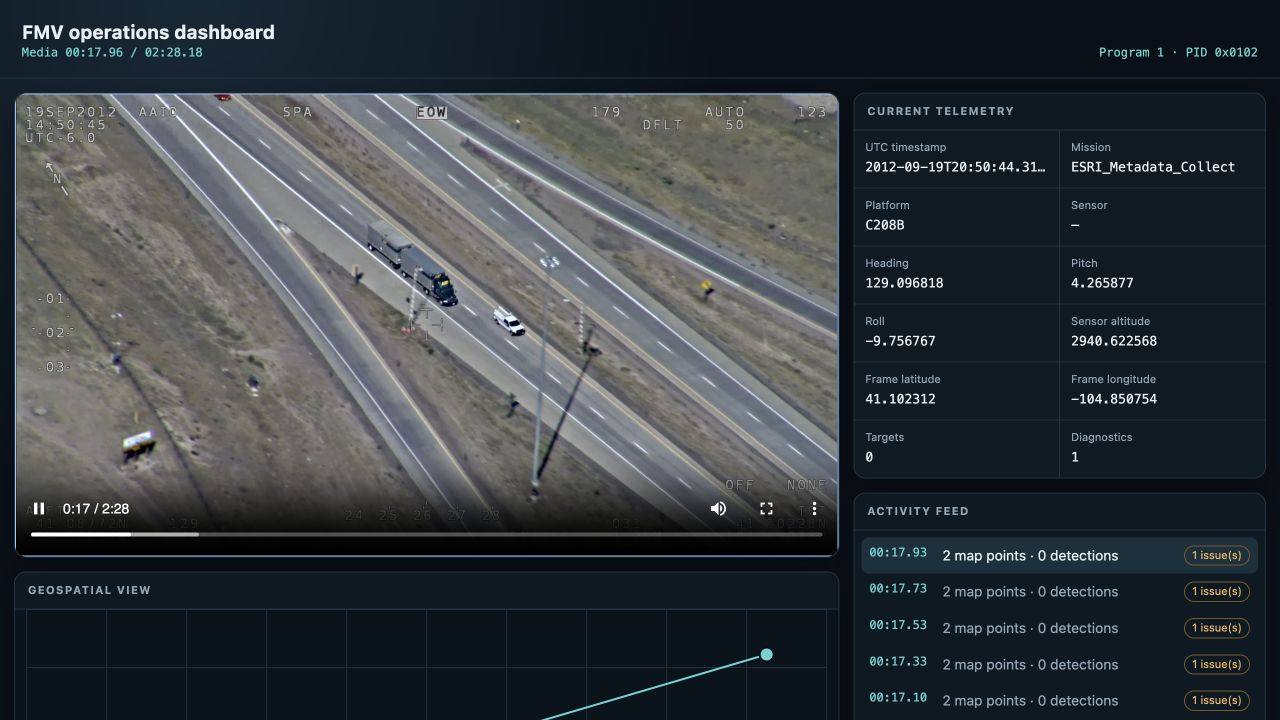
The screenshot is captured from the repository's runnable web-dashboard
tutorial, using the same prepare_player_assets() boundary as the reference
player. The video, telemetry, map, and activity feed are live output rather
than a design mockup.
Source decoder recovery messages are captured during preparation so a damaged but recoverable frame does not flood an operator terminal. A failed transcode still exits with the final actionable FFmpeg diagnostic.
The player draws normalized ST 0903 target bounding boxes, centroids, polygon
contours, compact row-major bit masks, labels, confidence, and lifecycle status
over the video when VMTI supplies frame dimensions and pixel geometry. Mask
runs remain compact in the timeline JSON and are split into rows only while
painting the canvas. The panel labels the raw precision timestamp as MISP time
and includes its exact microsecond count. When Item 136 is available, it also
derives a separate UTC timestamp after applying optional Item 137; it never
silently labels the unadjusted MISP count as UTC. The panel includes
mission/platform identity, platform attitude, sensor position and altitude,
sensor orientation/FOV, frame center, corner coordinates, target coordinates,
VMTI content, and engineering units when present. Its dependency-free canvas map
uses OpenStreetMap's standard raster tiles for the low-volume localhost demo,
shows the required attribution, honors browser caching, and keeps a bounded
96-tile cache without prefetching. Add ?basemap=off to the player URL for the
network-free coordinate-grid fallback. Production deployments should configure
or self-host a tile service whose usage policy matches their traffic instead of
treating the public OpenStreetMap service as an application backend.
The map plots current sensor, frame-center, target, and image-footprint geometry. Pixel-space VMTI bounding boxes are also projected into the current ST 0601 four-corner footprint with bilinear interpolation and drawn as ground polygons. This is an intentionally labelled visualization estimate, not terrain-aware camera-model geolocation. Embedded VMTI targets with absolute Location metadata or parent-relative latitude/longitude offsets are resolved to WGS-84 coordinates, plotted separately, and listed with latitude, longitude, HAE, target ID, and location source in the side panel. When legacy and newer scalar representations coexist, the panel and map use the full-range, HAE, or extended representation required by ST 0601.19 Section 6.1 and suppress the superseded field from the presentation view. The lossless decoded packet still retains both fields for diagnostics and re-encoding. A per-program/PID Report-on-Change tracker carries valid sparse ST 0601 values forward through the inclusive metadata refresh period, clears them immediately on a ZLI, and expires them after the period. The timeline scanner uses strict MPEG-TS/KLV structure while preserving malformed individual ST 0601 fields as diagnostics. The UI exposes those diagnostics in a dedicated warning panel for the selected metadata sample. Before the first timestamped sample, it leaves the fields, map, and overlays empty instead of displaying future telemetry. Empty, malformed, or unavailable timeline responses produce distinct operator-readable states.
The display toolbar can hide all overlays, show boxes or centers, set a minimum
confidence, and toggle individual VMTI classes without changing the underlying
metadata. Track trails join the same positive ST 0903 target ID over the last
30 retained metadata samples. They are meaningful when the producer supplies
persistent IDs, such as the first-party Ultralytics adapter in track mode;
per-frame prediction indices must not be interpreted as object identity.
The interactive detection timeline under the video uses at most one canvas bin
per rendered pixel, capped at 2,048 bins. It groups by time first, then stacks
the five most prevalent detection classes plus an exact-accounting other
group. Counts are log-scaled so dense periods remain comparable. Hover
summarizes the precise time interval and class counts; clicking, dragging,
Home/End, arrow/Page keys, and the range control all seek the same media clock.
No per-detection DOM nodes are created. The activity feed groups same-sample detections by label and
lifecycle state, retains a rolling 30-second window, and renders at most 40 rows;
it therefore does not create one DOM node for every observation in a long
mission. Each row shows media time, UTC when derivable, confidence, count, and
either a resolved location, an explicitly approximate footprint-interpolated
location, or an image-space only state.
Metadata AU sequence validation is disabled only for this diagnostic viewer because real fielded samples sometimes restart the sequence counter on every PES.
Coded platform and sensor fields are operator-readable without losing their
wire representation. For example, Platform Status appears as Egress (9) and
Generic Flag Data lists each asserted flag plus the hexadecimal mask. Timeline
JSON retains the numeric value, adds a display label, exposes a flags list
for bit sets, and provides decoded components for Weapon Load and Weapon
Fired. Applications can therefore render the label while continuing to filter,
store, or relay the exact code. The bundled UI limits raw floating-point values
to six decimal places for readability; this affects presentation only and does
not round the timeline's machine values.
scan_transport_file() and scan_transport_timeline() are also public APIs for
applications that want the synchronized, JSON-ready timeline without launching
the player. OverlayDetection exposes normalized contour points plus the
original compact OverlayMaskRun values and parent dimensions for custom
renderers. It also exposes ground_polygon and ground_polygon_source when a
box can be projected into an ST 0601 frame footprint. Each timeline sample
exposes its current geometry as GeoJSON features for a custom map UI.
summarize_detection_timeline() exposes the same sparse, bounded-label overview
used by /metadata/summary for custom services and offline indexing jobs.
The default basemap behavior follows the OpenStreetMap tile usage policy.
MetadataTimeline.media_start_pts is the earliest first PTS among the mapped
audio and video elementary streams. Sample times are relative to that anchor,
matching FFmpeg's output-media time origin and preserving any audio lead-in.
video_start_pts separately retains the first video PTS. On the Esri Truck
fixture, this distinction prevents a measured 2,777-tick (30.856 ms) early
metadata display error.
Recorded mode prepares a complete deterministic, seekable MP4 before serving. Live mode instead uses the included bounded MSE gateway. Deployments that need sub-second glass-to-glass latency, NAT traversal, adaptive bitrate, many-viewer fan-out, or browser-to-browser media should still place WebRTC or a production streaming service at the same metadata boundary.